Class 2 Document Signer Certificate (.pfx)
Limited Time Offer
Digitally sign bulk PDF documents with ease using a secure, legally valid certificate.
Key Features:
- .pfx file for easy integration
- Ideal for automated/bulk PDF signing
- Legally recognized under the Indian IT Act
- Enhances document authenticity and security
- Suitable for enterprise-level workflows
- Personal ID Proof: PAN Card, Passport
- Address Proof: Aadhaar Card, Passport/Utility Bill (if address differs from Aadhaar).
- Organisation Proof (if applicable): GST Certificate/Partnership Deed/Company Incorporation Certificate.
- Authorisation Letter: This is for signatories (if representing an entity).
- Photo: Recent passport-sized photograph.
- Video KYC Readiness: Original documents for live verification.
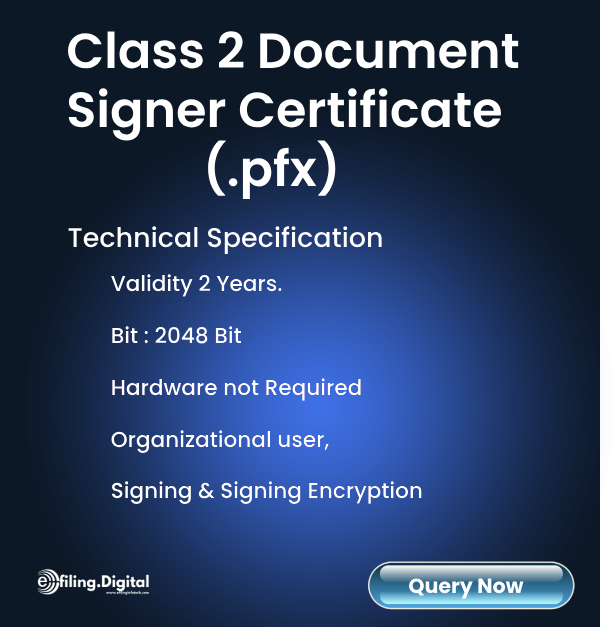
- Hardware: Not Required. Comes in .PFX File
- Available Validity: 2 Years
- Bit: 2048 Bit
- Type of User: Organization User
- Type of Certificate: Signing / Signing & Encryption
- Email Delivery : An email from the Signing Authority (CA) will be sent along with Doc Signer.
- Validity: 1,2 or 3 years (user’s choice).
- Installation Guide: Step-by-step setup instructions.
- 24/7 Support: Assistance for DSC activation and troubleshooting.
- Document Upload: Submit scanned copies of PAN, Aadhaar, and entity proofs (if applicable).
- Video Verification: Show original documents via live video call.
- Fee Payment: Pay online (varies by provider and validity).
- DSC Generation: Doc Signer Issued post-KYC approval.
- Dispatch: Email from CA along with the Doc Signer will be sent to registered email address
Standard: 2-3 working days after document submission.
Delays: If additional document verification is needed (*+1-2 days*).
Why Choose This Service?
Class 2 Document Signer Certificate (.PFX)
A Class 2 Document Signer Certificate (.PFX) is a software-based digital signature certificate used to automatically sign PDF documents, invoices, reports, certificates, agreements, and business files without requiring a physical USB token.
It is specially designed for businesses, ERP systems, accounting software, billing platforms, fintech solutions, and enterprise applications that generate documents in bulk and need automated digital signing.
Unlike traditional USB token DSCs that require manual signing, a .PFX Document Signer Certificate enables server-side and API-based digital signing for faster workflows, reduced manual work, and secure document authentication.
Businesses commonly use Document Signer Certificates for:
- GST invoice signing
- eInvoice generation
- Automated PDF signing
- ERP document workflows
- Payroll and HR documents
- Banking & NBFC statements
- Insurance policy generation
- SaaS application document signing
- Bulk customer communication PDFs
Why Businesses Choose a .PFX Document Signer Certificate
Modern businesses generate hundreds or thousands of documents daily. Manually signing each file using a USB token slows down operations and increases dependency on physical devices.
A Class 2 Document Signer Certificate helps businesses automate the entire digital signing process.
Key Benefits
Automate Bulk Document Signing
Digitally sign invoices, PDFs, reports, and customer documents automatically through your software or API integration.
No Physical USB Token Required
The certificate works as a software-based .PFX file, making it suitable for servers, cloud environments, and automated systems.
Faster Document Processing
Reduce manual effort and speed up invoice generation, approvals, and customer communication.
Legally Valid Digital Signature
Provides secure and verifiable digital signing for business workflows and compliance processes.
Easy Integration with ERP & Applications
Can be integrated with:
- Billing software
- ERP systems
- CRM platforms
- Accounting software
- SaaS applications
- Web applications
- Enterprise automation systems
Improve Customer Trust
Digitally signed invoices and documents look professional and help customers verify authenticity.
Step-by-Step API Integration Guide
Integrating a Class 2 Document Signer Certificate into your application allows automatic PDF signing and document authentication directly from your software.
Step 1: Purchase & Download the .PFX Certificate
After verification, you receive:
- .PFX certificate file
- Certificate password
- Installation instructions
Store the certificate securely on your application server.
Step 2: Install Required Signing Library
Choose a digital signing library compatible with your technology stack.
Common Options
- Java PDF signing libraries
- .NET signing SDKs
- Node.js PDF signing packages
- PHP OpenSSL libraries
- Python cryptographic libraries
Many businesses integrate the certificate using:
- Adobe PDF APIs
- iText PDF
- Apache PDFBox
- OpenSSL
- DSS libraries
Step 3: Load the .PFX Certificate
Your application securely loads the certificate using:
- Certificate path
- Password authentication
- Server-side access permissions
This enables the application to authenticate and sign documents automatically.
Step 4: Generate or Upload PDF Documents
The system creates or receives the PDF file that needs digital signing.
Examples include:
- GST invoices
- Salary slips
- Agreements
- Certificates
- Financial statements
- Customer reports
Step 5: Apply Digital Signature
The API signs the PDF document electronically using the .PFX certificate.
The signed document includes:
- Digital signature validation
- Signer identity
- Timestamp support
- Tamper detection
Step 6: Deliver Signed Documents Automatically
After signing, documents can be:
- Downloaded by customers
- Sent via email
- Uploaded to portals
- Stored in ERP systems
- Shared with government platforms
This creates a fully automated digital document workflow.
Class 2 vs Class 3 Document Signer Certificate
Businesses often compare Class 2 and Class 3 Document Signer Certificates before implementation.
Class 2 Document Signer Certificate
Best for:
- Automated PDF signing
- Internal business documents
- Invoice automation
- ERP integrations
- Bulk document workflows
Main Advantages
- Software-based .PFX format
- No USB token dependency
- API integration support
- Faster automation
- Cost-effective for enterprises
Common Usage
- GST invoices
- Billing systems
- Automated reports
- HR & payroll documents
- SaaS applications
Class 3 DSC
Best for:
- Government portal login
- eTendering
- MCA filing
- GST portal authentication
- DGFT transactions
Main Advantages
- Higher identity assurance
- Required for regulated portals
- Used with USB token authentication
Common Limitation
Class 3 DSC is generally designed for manual or token-based signing rather than automated server-side document workflows.
Which One Should You Choose?
Choose Class 2 Document Signer Certificate if you need:
- API-based PDF signing
- Bulk document automation
- ERP integration
- Server-side digital signatures
- Faster business workflows
Choose Class 3 DSC if you need:
- Government compliance portal access
- eTender participation
- Statutory filings requiring token authentication
Real Business Use Cases of Document Signer Certificate
GST Invoice Automation
Businesses generating hundreds of GST invoices daily can automatically sign invoices directly from their billing software or ERP system.
Example
An ecommerce company generates 5,000 invoices daily. Instead of manually signing PDFs, the system automatically applies a digital signature before emailing invoices to customers.
Result:
- Faster invoice delivery
- Reduced staff workload
- Improved GST compliance
- Professional invoice authentication
ERP Document Signing
Manufacturing companies use Document Signer Certificates inside ERP systems like SAP to sign:
- Purchase orders
- Delivery challans
- Tax invoices
- Vendor documents
This removes manual approval bottlenecks.
HR & Payroll Automation
Organizations digitally sign:
- Salary slips
- Offer letters
- Employee certificates
- HR agreements
This improves operational efficiency and reduces paperwork.
Banking & Financial Statements
NBFCs and financial companies use automated digital signing for:
- Loan statements
- Customer reports
- EMI schedules
- Financial summaries
This helps maintain document authenticity at scale.
SaaS Platform PDF Signing
Software companies integrate .PFX signing into their SaaS products to allow automated customer document signing without manual intervention.
Security Best Practices for .PFX Files
A .PFX Document Signer Certificate contains sensitive cryptographic credentials. Proper security practices are essential to prevent misuse.
Store Certificates Securely
Keep .PFX files in:
- Encrypted storage
- Secure servers
- Restricted-access environments
Avoid storing certificates on public or shared systems.
Use Strong Password Protection
Always protect the certificate with:
- Complex passwords
- Rotating credentials
- Restricted admin access
Never hardcode passwords inside application code.
Restrict Server Access
Limit certificate access only to:
- Authorized applications
- Trusted administrators
- Secure signing services
Use role-based access control whenever possible.
Enable Audit Logs
Maintain logs for:
- Signature activities
- Certificate usage
- Failed access attempts
- Server-side signing events
This improves accountability and monitoring.
Use Secure APIs & HTTPS
Always process document signing over secure encrypted connections to prevent interception or unauthorized access.
Renew Certificates Before Expiry
Expired certificates can interrupt automated workflows and invalidate signing operations. Monitor renewal timelines proactively.
Why Choose eFiling for Document Signer Certificate?
Businesses choose eFiling because they need more than just a certificate — they need reliable implementation support, fast issuance, and technical guidance.
Fast Processing & Expert Support
Get assistance with:
- Application setup
- Verification process
- Certificate installation
- API integration guidance
- Technical troubleshooting
Support for Developers & Enterprises
Ideal for:
- ERP integrations
- SaaS applications
- Enterprise billing systems
- Automated PDF workflows
- Custom software platforms
Trusted & Secure Issuance
Certificates are issued through authorized processes with proper identity verification and compliance standards.
Guidance for Automation Projects
Whether you're building:
- GST invoice automation
- Bulk PDF signing systems
- Digital workflow platforms
- Enterprise document management solutions
Our team helps simplify implementation.
Supported Applications & Software
Class 2 Document Signer Certificates support integration with various enterprise applications, PDF tools, and automation systems.
Commonly Supported Platforms
PDF & Document Applications
- Adobe Acrobat
- Adobe Reader
- PDF signing software
- Document workflow systems
ERP & Enterprise Platforms
- SAP
- Oracle ERP
- Microsoft Dynamics
- Tally integration systems
- Custom ERP solutions
Development Platforms
- Java applications
- .NET applications
- PHP applications
- Python applications
- Node.js applications
Business Systems
- Billing software
- Accounting systems
- HRMS platforms
- CRM software
- SaaS products
Price Summary
Total Amount
₹ 15,930